Prove Ansible Template Idempotence with Check Mode and Diff
Build a tiny localhost Ansible lab that renders a config file, proves the second run is idempotent, and uses check mode plus diff to preview a safe variable change without rewriting the file.
By Network Nuts · Published 2026-10-18
Lab environment
This lab was verified on Ubuntu 26.04 x86_64 with 6 vCPU, about 12 GB RAM, Python 3.14.4, Git 2.53.0, and ansible-playbook from ansible-core 2.20.1. It ran against localhost with the local connection plugin, no sudo, and no real service reload.
That last point matters. The handler in this walkthrough only prints a message, so the lab proves Ansible change detection and handler behavior without touching a running daemon.
Prerequisites
You need Python 3, ansible-core, and a new empty working directory. Open the linked source folder from the publisher, place its files into that disposable directory, and run the exact command used in the lab:
python3 run.py
The tested bundle uses these files:
playbook.ymlapp.conf.j2run.py
The playbook uses the fully qualified ansible.builtin.template module, which is the recommended form in the official module documentation because it avoids name conflicts and links clearly to the built-in module docs (Ansible template module).
What this lab is trying to prove
Many Ansible beginners can write a template task, but fewer can explain how to verify that it is idempotent. In practice, idempotence means you can apply the same desired state repeatedly and Ansible changes the target only when something is actually different.
This lab proves three useful points:
- The first run creates or updates the rendered file, so Ansible reports
changed=1. - The second identical run finds the system already in the desired state, so Ansible reports
changed=0. - A check-mode preview with
--check --diffshows what would change for a new variable value without overwriting the existing file, which matches Ansible’s documented behavior for check mode and diff mode (validating tasks with check mode and diff mode, ansible-playbook CLI reference).
Inspect the playbook before running it
The playbook is intentionally small:
---
- name: Keep a local application configuration consistent
  hosts: localhost
  connection: local
  gather_facts: false
  vars:
    app_port: 8080
    app_workers: 2
  tasks:
    - name: Render application settings
      ansible.builtin.template:
        src: app.conf.j2
        dest: "{{ playbook_dir }}/app.conf"
        mode: '0640'
      notify: Report configuration change
  handlers:
    - name: Report configuration change
      ansible.builtin.debug:
        msg: Configuration changed; a real service could be reloaded here
And the template file is just as small:
port={{ app_port }}
workers={{ app_workers }}
A few details are worth noticing.
Localhost inventory and local connection
The runner calls:
ansible-playbook -i localhost, playbook.yml
The trailing comma in localhost, makes it an inline inventory with one host. Combined with connection: local, Ansible runs the task on the local machine instead of trying to SSH to a remote system.
The destination path uses playbook_dir
The rendered file is written to {{ playbook_dir }}/app.conf, which keeps the lab self-contained in the disposable working directory. Ansible documents playbook_dir as a special variable representing the path of the current playbook (special variables reference).
The handler only runs on change
The template task has notify: Report configuration change. Ansible handlers are designed to run only when a notifying task reports a change, which is exactly why they are useful for controlled restarts or reloads (handlers documentation).
In this lab the handler only emits a debug message, which makes the behavior easy to observe without introducing service-management side effects.
Run the lab and read the result correctly
From the disposable directory, run:
python3 run.py
The helper script runs the playbook three times:
- a normal first apply
- a second identical apply
- a preview with
--check --diff -e app_port=9090
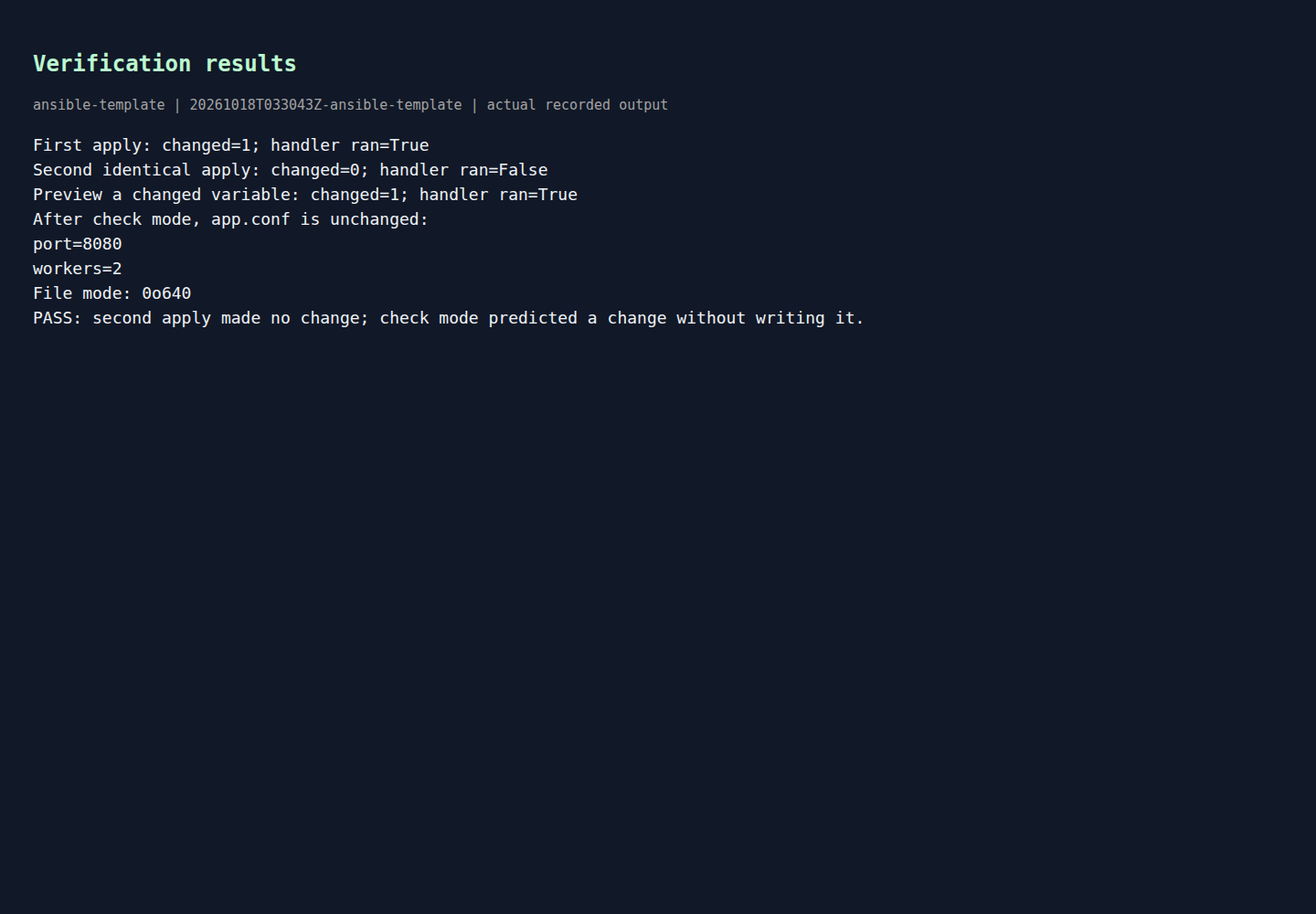
It also verifies that the final app.conf content stays at the original value after the check-mode preview and that the file mode is 0640.
First apply: Ansible should report a real change
On the first run, the file does not yet match the desired rendered state, so the template task reports changed. Because that task changed something, the handler is notified and runs.
This is the normal and healthy outcome for an initial configuration render. The template module documentation notes that the module supports diff mode fully, so file-content changes can be compared in a readable before/after format when requested.
Second identical apply: this is the idempotence check
The second run is the critical one. Nothing about the playbook inputs changed, so Ansible should decide that app.conf already matches the desired state. In that case:
- the task returns
ok, notchanged - the play recap shows
changed=0 - the handler does not run
That combination is the practical proof of idempotence in this tiny lab. You are not merely assuming the task is safe to repeat; you are watching Ansible compare desired state to current state and decide there is nothing to do.
Rendered output from actual lab commands. Captured 18 October 2026, 09:00 IST. Open full-size image
If your own rerun still shows changed=1, that usually means one of four things:
- the template content really changed
- a variable value changed
- file metadata such as mode differs from the declared value
- the destination file is being altered outside Ansible between runs
Preview a proposed change with check mode and diff
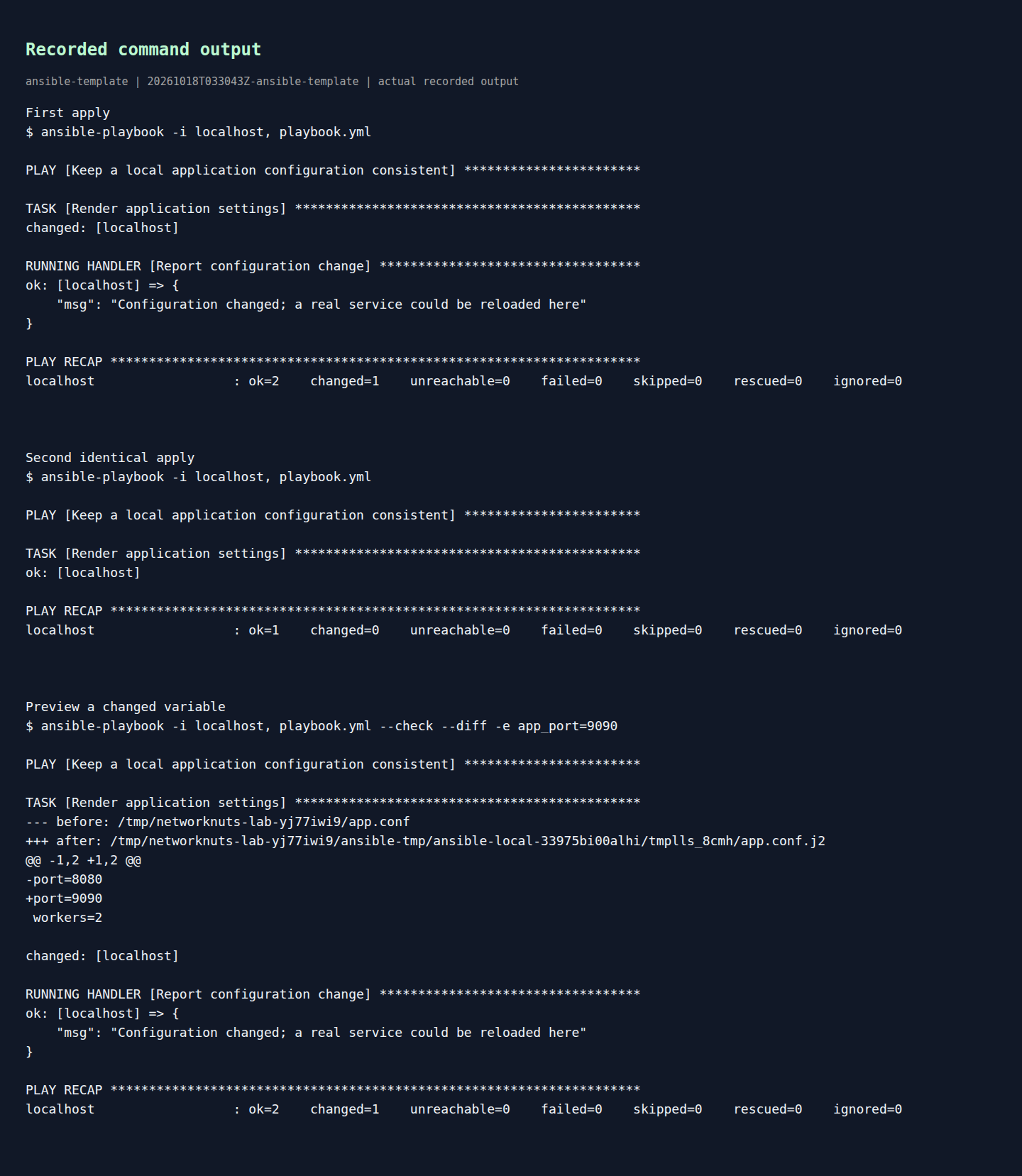
The third run uses:
ansible-playbook -i localhost, playbook.yml --check --diff -e app_port=9090
This is where the lab becomes more useful than a simple “run it twice” demo.
According to Ansible’s documentation, check mode simulates a playbook run without making changes, while diff mode shows before-and-after comparisons for modules that support it (validating tasks with check mode and diff mode). The template module supports this well, so the lab shows a diff where only one line would change:
port=8080port=9090
That is exactly the kind of preview you want before touching a real service configuration.
The lab script then confirms that app.conf is still:
port=8080
workers=2
and that its mode remains 0o640.
So the run reported a predicted change, but the file on disk stayed untouched. That is the correct interpretation of check mode here.
Why the handler appears during the check-mode preview
One detail often surprises people: during the preview run, the handler is shown as running even though no file is actually rewritten.
That does not mean a real service was reloaded in this lab. It means Ansible predicted that the notifying task would change state, so it followed the handler logic for that simulated run. The handler itself is only a debug task here, which is safe.
In a production playbook, this is a reminder to think carefully about tasks that are not safe or meaningful in check mode. Ansible documents per-task check-mode controls and explains that not every module behaves the same way in simulation (check mode and diff mode guide).
Rendered output from actual lab commands. Captured 18 October 2026, 09:00 IST. Open full-size image
For this reason, treat check mode as strong evidence for file-rendering tasks like template, but not as a universal guarantee for every possible playbook design. The official docs explicitly note that check mode is a simulation and can be less useful when later tasks depend on registered variables or conditional behavior from earlier tasks (check mode and diff mode guide).
What this means for real RHCE-style automation
This is a small localhost lab, but the pattern scales well:
- render configuration from variables
- notify a handler only when the render changed
- rerun the playbook to prove idempotence
- preview proposed edits safely with
--check --diff
That workflow is a strong habit for anyone preparing for larger automation work with RHCE training. It helps you distinguish “the playbook ran” from “the playbook converged cleanly.”
One more safety note: diff output can expose sensitive configuration values. Ansible documents that you can disable diff reporting for specific tasks when needed, which is important for secret-bearing templates even though this simple lab contains no secrets (check mode and diff mode guide).
Cleanup
Because the lab is designed for a fresh disposable directory, cleanup is simple: inspect the generated app.conf and any recorded output you want to keep, then remove that directory.
For example, if you created a throwaway folder for the bundle:
cd ..
rm -rf your-lab-folder
Only remove the folder you created for this lab. The playbook writes app.conf into its own working directory by design, so cleanup should stay contained if you followed the disposable-directory requirement.
Example source files
The supporting code and configuration on GitHub contain the complete example files discussed in this article.