Separate JSON Parse Errors from Config Validation in Python
Learn a clean Python pattern that reports malformed JSON separately from valid JSON with invalid port values.
By Network Nuts · Published 2026-10-20
Yes: handle JSON parsing and application validation as two separate stages. In this lab, a tiny Python CLI accepts a file only when it is valid JSON and its port value is a real integer in range. Malformed JSON fails during deserialization; syntactically valid but semantically wrong JSON fails in a second validation step, which gives operators much clearer feedback.
Lab environment
This walkthrough is based on a verified lab run with the following environment:
- Ubuntu 26.04 x86_64
- 6 vCPU
- About 12 GB RAM
- Python 3.14.4
- Python standard library only, in an isolated temporary directory
Prerequisites
You need:
- Python 3
- A new empty working directory
- The tested source bundle exported with this article
- A shell where you can run
python3
Use a disposable folder for this lab. The runner creates several small JSON files plus details.txt, and the validator reads the file path you pass on the command line. Nothing here needs root access.
Parse first, validate second
The important design choice is the boundary between deserialization and business-rule checks. Python's json module raises JSONDecodeError when the input is not a valid JSON document, and it converts JSON objects, strings, numbers, booleans, and null into normal Python values before your own validation logic runs. (docs.python.org)
In the tested lab, the core function is deliberately small:
def load_config(path):
    value = json.loads(Path(path).read_text())
    if not isinstance(value, dict):
        raise ValueError('Configuration must be an object')
    port = value.get('port')
    if type(port) is not int or not 1 <= port <= 65535:
        raise ValueError('port must be an integer from 1 to 65535')
    return value
That gives you two distinct failure stages:
json.loads(...)answers, "Is this file valid JSON?"- The later
dict, type, and range checks answer, "Is this acceptable for my application?"
That separation is what makes configuration loaders easier to debug. A broken comma, missing value, or extra brace should not be reported as a port-policy problem. Likewise, a perfectly valid JSON document such as {"port": "8080"} should not be described as malformed JSON when the real problem is your application's expected type. Python's exception tutorial also recommends catching specific exceptions rather than using a wide catch-all, which supports this kind of boundary. Errors and Exceptions explains that specific handlers are better practice and that the first matching except clause wins. (docs.python.org)
Why the port check uses type(port) is not int
One subtle part of this lab is more interesting than it first looks. The script does not use isinstance(port, int). It uses type(port) is not int.
That is deliberate. Python documents that the bool class is a subclass of int, and the json decoder maps JSON true and false to Python True and False. That means isinstance(True, int) would be true, which is not what you want for a TCP port. Using type(port) is not int rejects {"port": true} cleanly instead of accidentally treating it like port 1. See the built-in bool() documentation and the JSON conversion table in the standard library docs. (docs.python.org)
This is a good DevOps habit: validate the exact type you want, not just something that can behave numerically in Python.
Keep the CLI behavior predictable
The tested script also uses normal command-line exit codes:
if __name__ == '__main__':
    if len(sys.argv) != 2:
        print('Usage: python3 validate_config.py FILE', file=sys.stderr)
        sys.exit(2)
    try:
        config = load_config(sys.argv[1])
    except (OSError, ValueError) as error:
        print(f'Invalid configuration: {error}', file=sys.stderr)
        sys.exit(1)
    print(f'Configuration accepted: port={config["port"]}')
Python's sys.exit uses 0 for success and nonzero values for abnormal termination, and the standard library notes the common Unix convention of using 2 for command-line syntax problems and 1 for other errors. That matches the intent here: wrong invocation is different from a bad configuration file. (docs.python.org)
For a small one-file tool, catching OSError and ValueError together is fine. The lab proves the important part: parse failures and semantic validation failures still happen at different stages, even if this simple CLI prints them under the same Invalid configuration: prefix.
Run the recorded checks
Open the exported source bundle for this article, place the files in a new empty directory, and run the exact command used in the lab:
python3 run.py
The runner creates five sample JSON files, executes python3 validate_config.py FILE against each one, checks the expected exit code, and writes the detailed per-file transcript into details.txt.
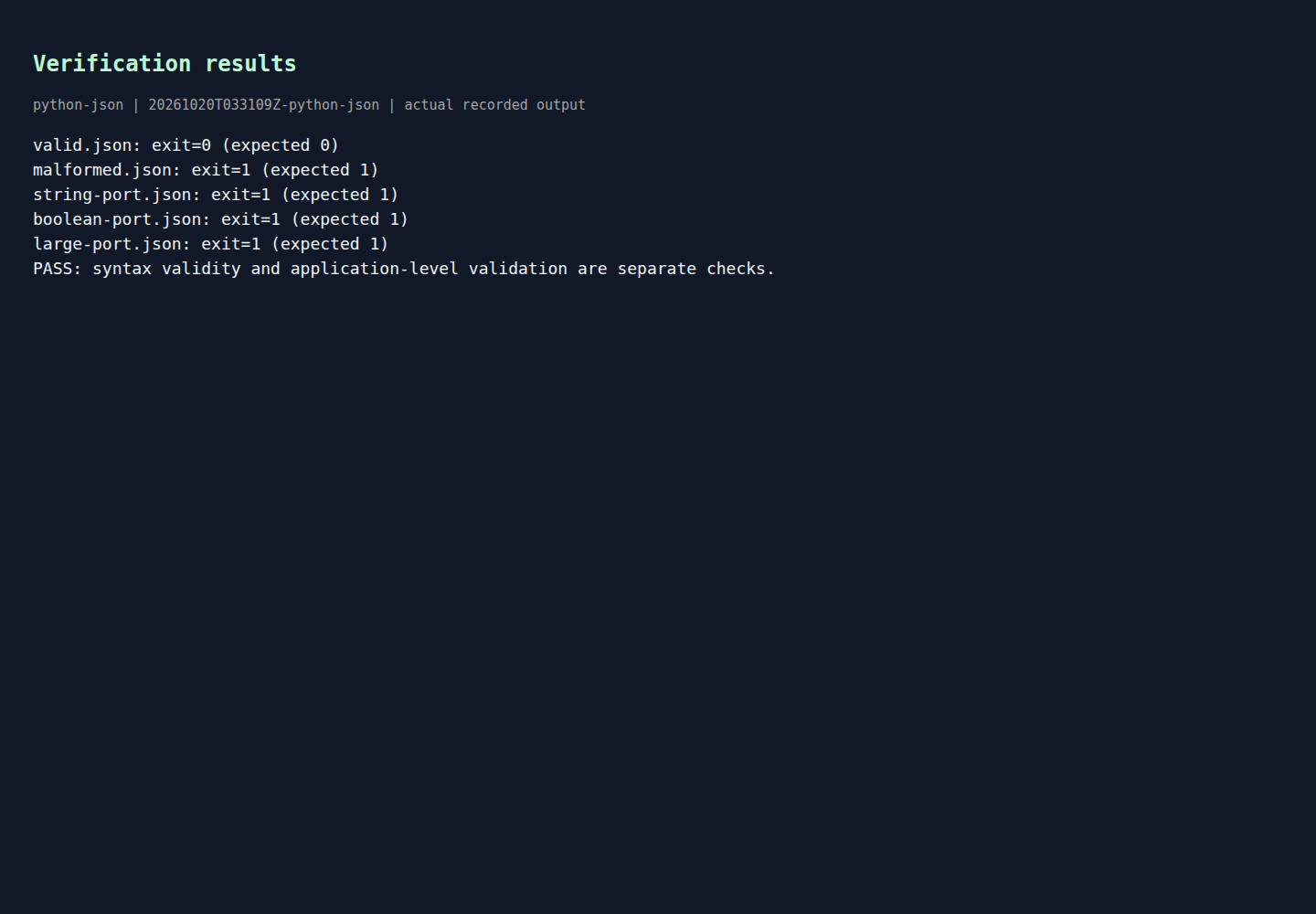
In the verified run, the summary output was:
Rendered output from actual lab commands. Captured 20 October 2026, 09:01 IST. Open full-size image
This is the high-level proof that the loader is doing two jobs correctly:
- one valid configuration is accepted with exit code
0 - malformed JSON is rejected
- valid JSON with the wrong type is rejected
- valid JSON with a boolean in place of an integer is rejected
- valid JSON with an out-of-range integer is rejected
What each recorded result means
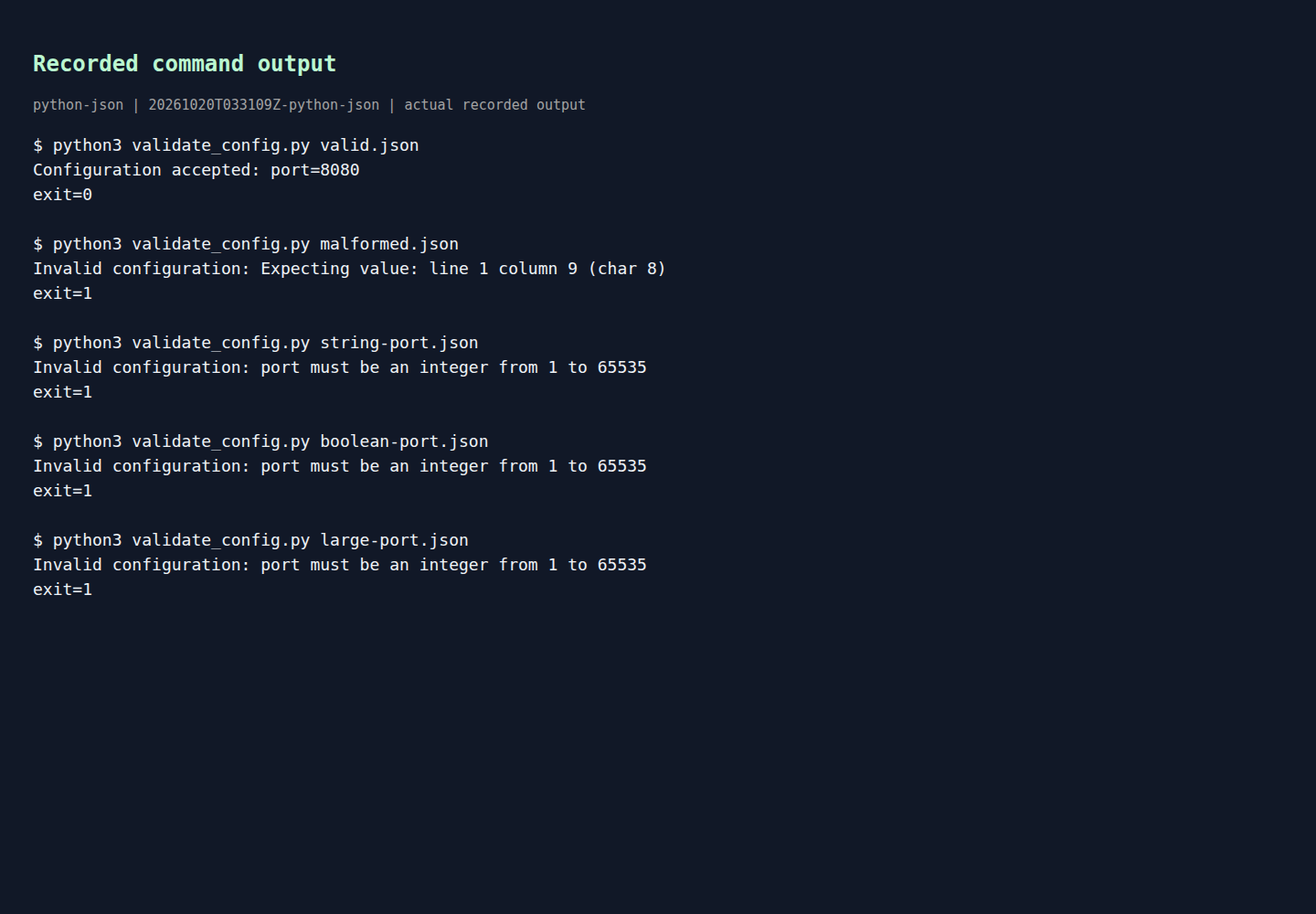
The saved transcript shows the exact operator-facing messages from each call to validate_config.py:
Rendered output from actual lab commands. Captured 20 October 2026, 09:01 IST. Open full-size image
Read those five cases carefully because they show the boundary working in practice.
valid.json
{"port":8080} is both valid JSON and acceptable application input, so the program prints Configuration accepted: port=8080 and exits 0.
malformed.json
{"port":} is not valid JSON at all. The failure message comes from the JSON parser: Expecting value: line 1 column 9 (char 8). That tells you the script never reached your application rule about port ranges. The parse stage failed first, exactly as the json documentation says it should when the document is invalid. (docs.python.org)
string-port.json
{"port":"8080"} parses successfully because quoted text is valid JSON. Only after parsing does the application reject it with port must be an integer from 1 to 65535. This is the classic example of syntactically valid JSON that is still bad configuration.
boolean-port.json
{"port":true} also parses successfully because JSON booleans are valid syntax. The important part is that it still fails validation, proving the script is not accidentally accepting a Python bool where it really wants an integer port. That lines up with Python's documentation that bool is a subclass of int, which is why the stricter type(port) is int style matters here. (docs.python.org)
large-port.json
{"port":70000} is valid JSON and a real integer, but it violates the allowed port range, so the range check rejects it. This is application policy, not parsing.
Taken together, the run demonstrates the exact lesson most configuration loaders need: deserialization answers whether the file can be read as JSON; validation answers whether the decoded values are safe and meaningful for your tool.
If you want separate top-level error messages
The lab's tested script groups ValueError and OSError under one message prefix. If you want a clearer operator experience, split the handlers so malformed JSON and bad settings are reported differently.
The key detail is ordering. Because JSONDecodeError is a more specific exception from the JSON layer, it should be caught before a broader validation exception. Python's exception-handling rules say the first matching except clause is the one that runs. Errors and Exceptions covers that matching behavior, and the language reference shows how raise ... from ... preserves the original cause when you decide to wrap lower-level exceptions in your own application exception. (docs.python.org)
A larger version of this loader could look like this:
try:
    config = load_config(sys.argv[1])
except json.JSONDecodeError as exc:
    print(f'Malformed JSON: {exc}', file=sys.stderr)
    sys.exit(1)
except OSError as exc:
    print(f'Cannot read file: {exc}', file=sys.stderr)
    sys.exit(1)
except ValueError as exc:
    print(f'Invalid settings: {exc}', file=sys.stderr)
    sys.exit(1)
That example was not part of the recorded execution, but it follows the same standard-library behavior demonstrated by the lab and documented by Python. If your project grows beyond a tiny script, introducing a custom ConfigError and using raise ConfigError(...) from exc is a clean next step. The raise statement reference documents exception chaining through the from clause. (docs.python.org)
Limits of this lab
This walkthrough intentionally stays small and standard-library-only. It validates one field, one file, and one simple rule set. It does not try to provide full schema management, nested object validation, defaults merging, environment-variable overlays, or multi-error reporting.
That limitation is useful, not a flaw. For many internal tools, CI helpers, deployment wrappers, and small admin scripts, a clear parse stage plus a clear validation stage is enough. If you want deeper Python automation patterns in that same practical style, the Python for DevOps training is the course this lab aligns with.
Cleanup
Because the runner creates sample JSON files and details.txt, cleanup is simple: delete the disposable working directory after you finish reviewing the output.
Example source files
The supporting code and configuration on GitHub contain the complete example files discussed in this article.