Why git diff and git diff --staged Show Different Changes
See exactly why one file can show two different diffs by comparing HEAD, the index, and the working tree in a disposable Git lab.
By Network Nuts · Published 2026-10-21
If git diff and git diff --staged seem to disagree about the same file, Git is usually doing exactly what it should. The two commands compare different snapshots: plain git diff compares your working tree to the index, while git diff --staged (same as --cached) compares the index to HEAD according to the official git diff documentation. This lab reproduces that state with one file so you can see why both outputs are correct.
Lab environment
This walkthrough uses the verified lab runtime exactly as captured:
- Ubuntu 26.04 x86_64
- 6 vCPU and about 12 GB RAM
- Git 2.53.0
- Python 3.14.4
- A new disposable local Git repository
- No remote and no credentials
The captured environment also had ansible-playbook [core 2.20.1] installed, but Ansible is not used in this lab.
Prerequisites
You need:
- Git
- Python 3
- A new empty working directory outside any existing Git repository
Safety notes:
- Run this only in a disposable folder. The script initializes a repository and writes
settings.txtplusdetails.txt. - The lab does not contact any remote repository and does not require credentials.
- The behavior shown here is standard Git snapshot behavior, but the exact object IDs in diff headers can vary between runs.
If you want deeper structured practice after this walkthrough, the GIT Version Control Training course covers the staging area and commit workflow in a more systematic way.
The mental model: three snapshots, not one file
The confusion comes from thinking about “the file” as one thing. Git tracks at least three relevant states here:
HEAD: the version from the last commit.- The index: also called the staging area, which Git uses to prepare the next commit according to
git addandgitdatamodel. - The working tree: the file as it exists on disk right now.
That means one path can legitimately have two different kinds of changes at once:
- a change already staged in the index, and
- a newer change still unstaged in the working tree.
Git’s own git status documentation describes this as differences between HEAD and the index, and differences between the working tree and the index.
Run the verified lab
Open the linked source folder from the publisher bundle, copy its files into a new empty disposable directory, and run the exact tested command:
python3 run.py
The important part of the runner is that it creates one baseline commit, stages one edit, and then edits the same file again without staging the second edit:
Path('settings.txt').write_text('workers=1\n')
git('add','settings.txt')
git('commit','-qm','Baseline')

Path('settings.txt').write_text('workers=2\n')
git('add','settings.txt')
Path('settings.txt').write_text('workers=3\n')
That sequence matters:
workers=1is committed, so it becomesHEAD.workers=2is written and staged, so it becomes the index version.workers=3is written afterward, so it exists only in the working tree.
This matches the official git add behavior: it stages the file contents at the time git add runs, and later edits are not automatically included until you add them again, as described in the git add documentation.
Read the observed status first
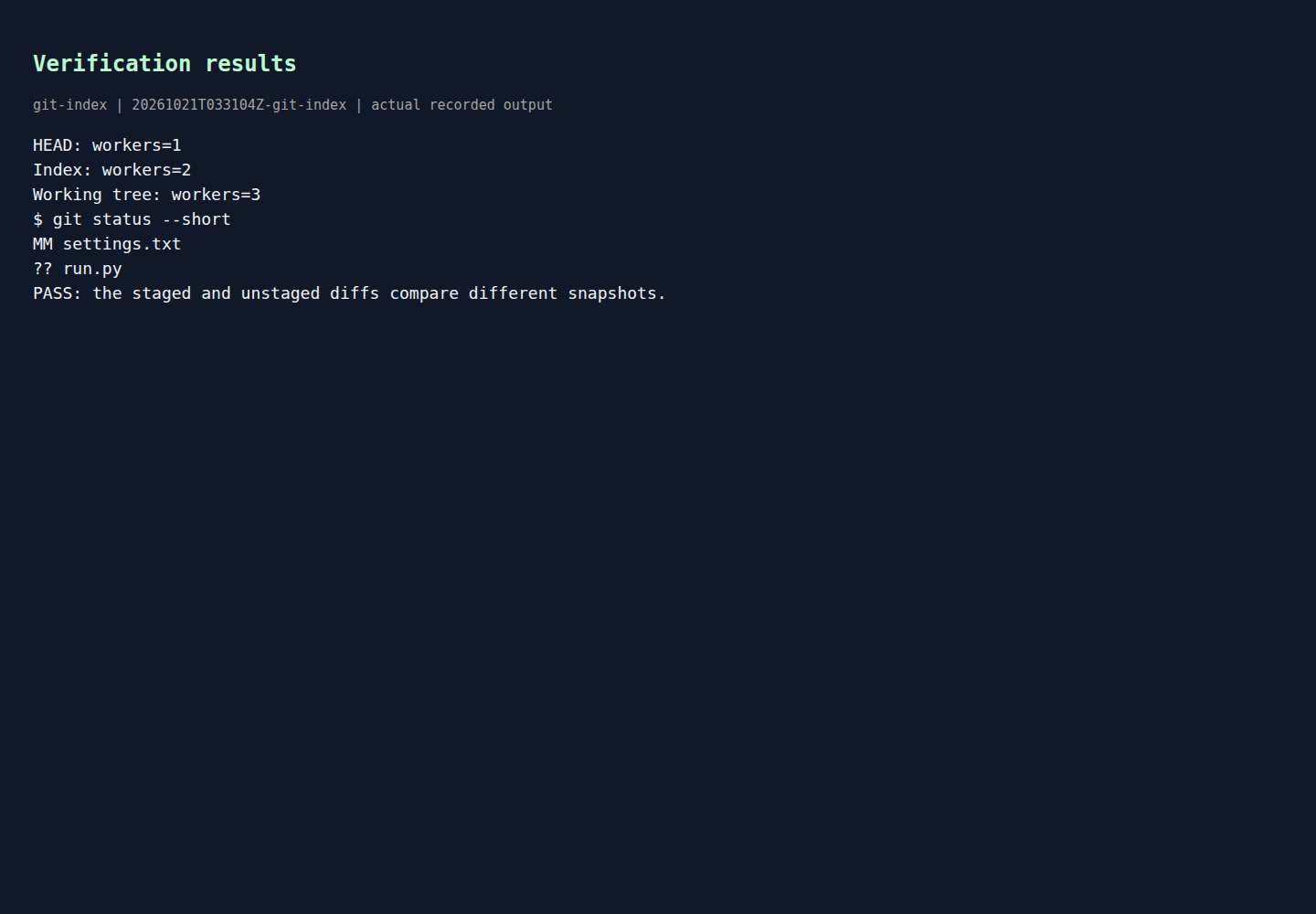
The runner printed this verification output:
Rendered output from actual lab commands. Captured 21 October 2026, 09:01 IST. Open full-size image
This result is the fastest way to confirm the repository state before you even inspect a diff.
The key line is:
MM settings.txt
In Git short status, X is the index state and Y is the working tree state, as documented in git status. So MM means:
- the file is modified in the index relative to
HEAD, and - the file is modified again in the working tree relative to the index.
That one line already tells you why two diff commands can disagree: they are not comparing the same pair of snapshots.
The other useful line is:
?? run.py
That simply means run.py is untracked. It is not part of the staged-versus-unstaged confusion; it is just the lab script sitting in the repository.
Inspect the two diffs side by side
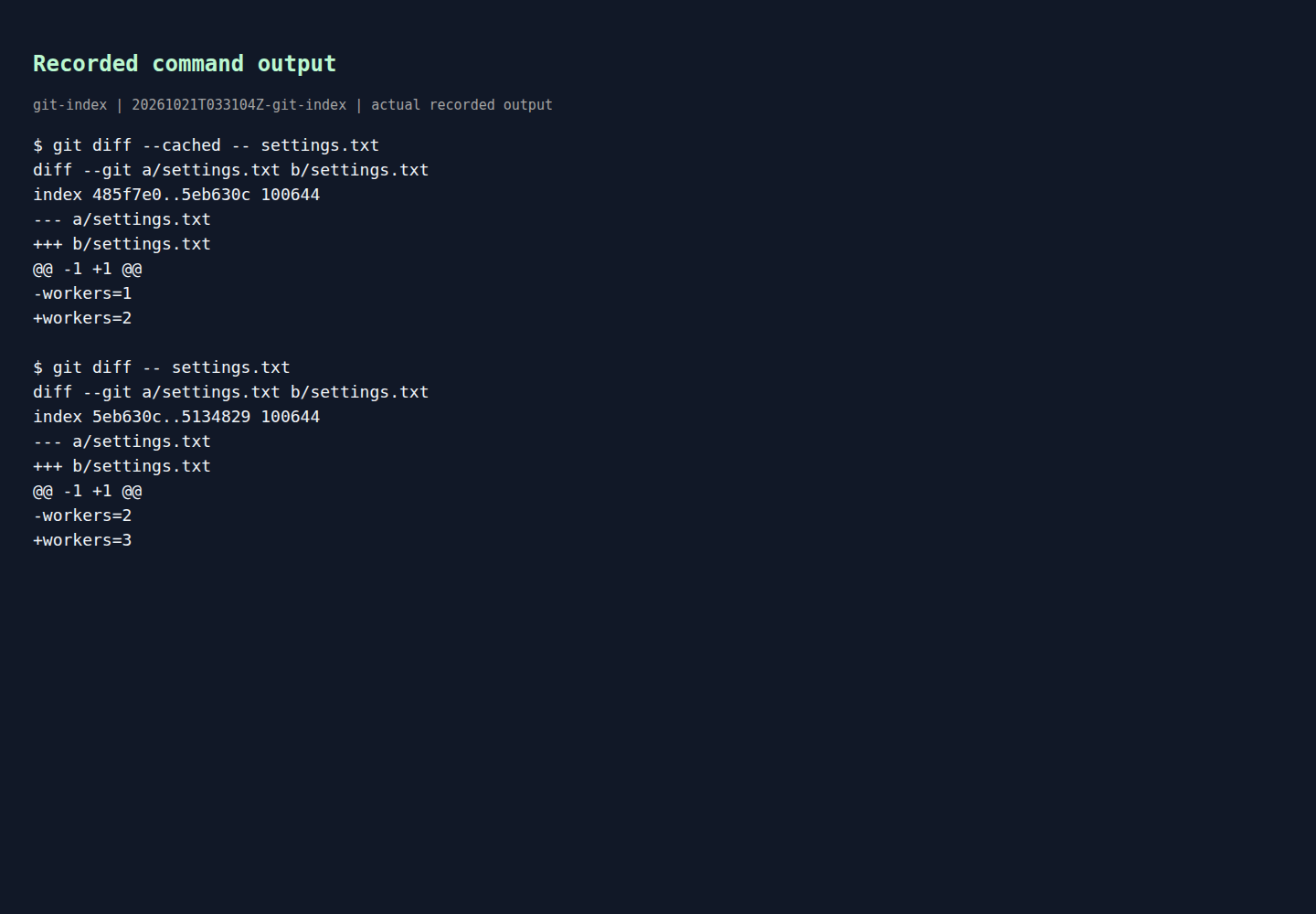
The lab also captured the exact staged and unstaged diffs for settings.txt:
Rendered output from actual lab commands. Captured 21 October 2026, 09:01 IST. Open full-size image
Now the reason becomes concrete.
What git diff --cached showed
The staged diff was:
-workers=1
+workers=2
That is the difference between:
HEAD=workers=1- index =
workers=2
This is why git diff --staged shows what would be included in the next commit. The official git diff documentation says --staged is a synonym for --cached, and that form shows staged changes.
What plain git diff showed
The unstaged diff was:
-workers=2
+workers=3
That is the difference between:
- index =
workers=2 - working tree =
workers=3
So plain git diff is not “wrong” and it is not ignoring the staged change. It is answering a different question: what changed since the last git add for this file?
A simple command map you can memorize
When one file has both staged and unstaged changes, this table is the quickest way to stay oriented:
| Command | Comparison | Practical question |
|---|---|---|
git diff | working tree vs index | What have I changed that is not staged yet? |
git diff --staged | index vs HEAD | What is already prepared for the next commit? |
git diff HEAD | working tree vs HEAD | What is different from the last commit overall? |
These comparisons follow the official git diff documentation.
In this lab, git diff HEAD -- settings.txt would effectively show the overall jump from workers=1 to workers=3, because it compares the working tree to the last commit. That is useful when you want the full picture, but it can hide the boundary between what is already staged and what still needs git add.
Why Git behaves this way
This behavior is not a quirk. It is what makes Git’s staging model useful.
Because the index is a separate snapshot, you can:
- prepare a clean commit,
- continue editing the same file,
- and decide later whether the newer edits belong in the same commit.
That is why the index exists in the first place. Git’s data model uses the index to build the next commit tree, as described in gitdatamodel. If Git always treated the working tree and the staging area as the same thing, you would lose that control.
The practical takeaway during daily work
When you feel that Git is “showing different changes for the same file,” use this order:
- Run
git status --short. - Check whether you see two-layer state such as
MM. - Run
git diffto inspect what is still unstaged. - Run
git diff --stagedto inspect what the next commit would contain.
That sequence is usually faster than staring at one diff and guessing.
A useful rule of thumb is:
- If you want to review the next commit, use
git diff --staged. - If you want to review what still needs
git add, use plaingit diff.
If you discover that you staged the wrong thing, the safest follow-on topic is how to undo that cleanly without damaging shared history. See What to do after reviewing the wrong staged or unstaged changes.
Common misunderstanding to avoid
A common mistaken assumption is: “I edited one file, so there should be one diff.”
In Git, the better assumption is: “A path may differ across multiple snapshots.” Once you adopt that model, the outputs stop looking contradictory:
HEADcan contain one version,- the index can contain a second,
- and the working tree can contain a third.
That is exactly what the verified lab proved:
HEAD: workers=1Index: workers=2Working tree: workers=3
The file path is the same, but the snapshots are different.
Cleanup
Remove only the disposable folder you created for this lab.
For example, from the parent directory:
rm -rf your-disposable-folder
Because the lab uses no remote and no credentials, cleanup is just local file removal.
Example source files
The supporting code and configuration on GitHub contain the complete example files discussed in this article.