CKA Certification Training - Certified Kubernetes Administrator
Certified Kubernetes Administrator training course is designed for the Kubernetes Administrators who want to learn how to develop the Kubernetes ecosystem. Certified Kubernetes Administrator (CKA) Training with Network Nuts prepares you for the Certified Kubernetes Administrator Exam.
About the course
You will learn how all of the components of a Kuberenetes cluster work together, how to monitor all components of a cluster, and how to build your own Kubernetes cluster from scratch. We will also cover networking, deploying applications, scheduling pods, logging, and a whole lot of practice in the command line.
Certification
The Certified Kubernetes Administrator (CKA) exam is heavily focused on practical application, as it is a hands-on test of your ability to run commands to perform specific actions. There are no multiple-choice questions in this exam. You will be given access to a command line and will be required to perform various tasks.
Course details
- Level: Intermediate
- Duration: 2 Months
- Recordings: 1 year access
What's included
- Online Training
- Classroom Training
- WhatsApp Support
- Mock Exams
- Course Certificate
CKA mock exams and ticket-based labs
50+ Kubernetes production practice tickets
Launch a fresh Kubernetes environment with a real fault already injected, restore the required state, and pass automatic verification across workloads, scheduling, networking, storage, security, RBAC, scaling, and cluster operations.
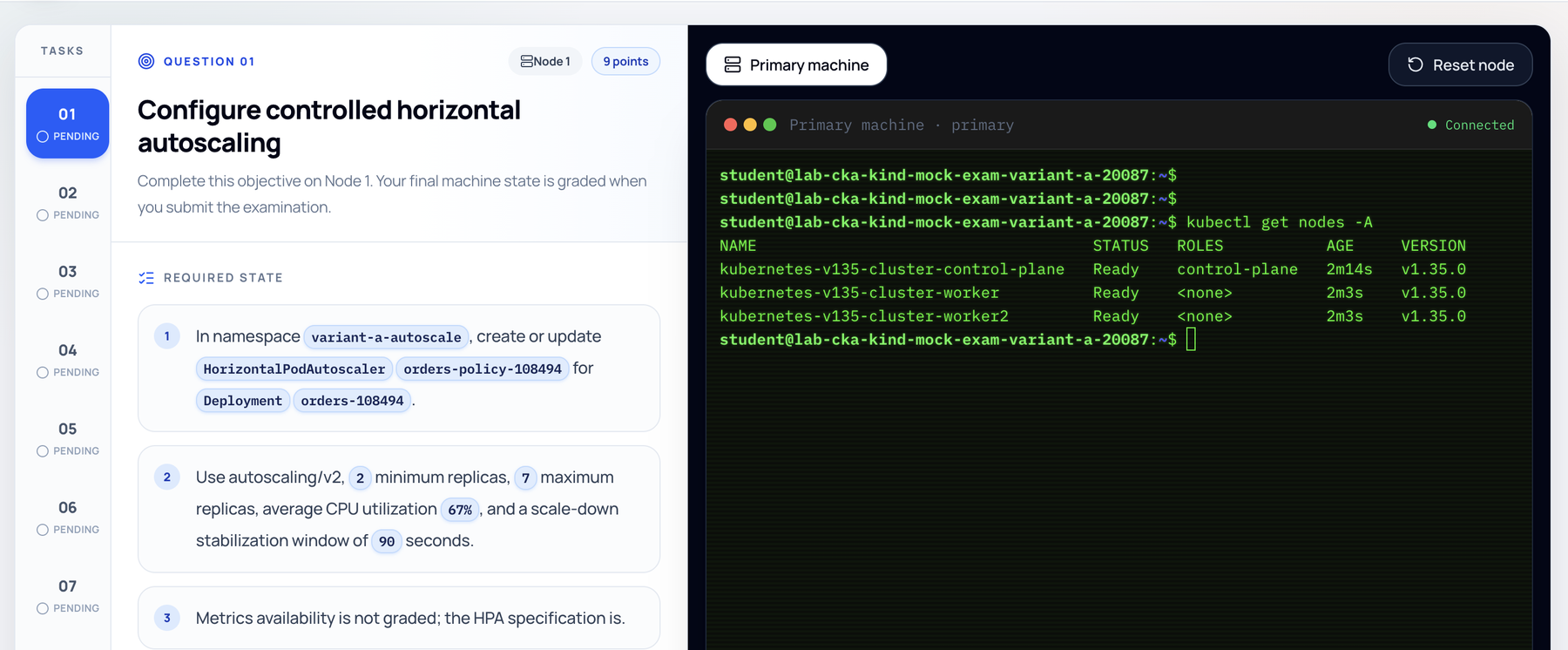
11-task CKA mock exam
Complete a timed, automatically graded set of Kubernetes administration tasks on a fresh Kind cluster and receive detailed results.
Course content
Introduction to Kubernetes
- Introduction to Certified Kubernetes Administrator Training
- Need of Kubernetes
Learning Core Concepts of Kubernetes
- ETCD in Kubernetes
- Kube-API Server
- Controller Manager
- Kube Scheduler
- Kubelet
- Kube-proxy
- Pods
- Replicasets
- Deployments
- Services
- Lab: Installing a Complete Kubernetes Cluster
Scheduling Pods - 1
- Manually Scheduling Pods
- Lab: Creating Pods using CLI
- Lab: Creating Pods using YAML
- Labels and Selectors in a Pod
- Lab: Settings Labels and Selectors on Pods
- Resource Requests and Limits
- Lab: Setting Requests and Limits on Pods
- Lab: Troubleshooting Resource Limits on Pods
- Daemonsets
- Static Pods
- Multiple Scheduler
- Quality of Service in Pods
- Lab: Using different QoS options in Pods
- Port Mapping on Pods
- Lab: Performing Port Mapping to access Containers in Pod
Scheduling Pods - 2
- Pods on specific Nodes
- Lab: Using Node Selectors in Pod Scheduling
- Lab: Creating Pods using YAML
- Affinity and Anti-affinity in Pod Scheduling
- Lab: Deploying Pods with Required Node Affinity
- Lab: Deploying Pods with Preferred Node Affinity
- Advanced Affinity Options in Pod Scheduling
- Lab: Multiple Affinity Selection
- Lab: Using not equal to operators in Affinity Selection
- Pod Priorities
- Lab: Creating Pod Priority Classes
- Lab: Scheduling Pods with Priority
- Taints in Nodes
- Lab: Performing Taints on Nodes
- Lab: Scheduling Pods on Nodes with Taints
Deployments in Kubernetes
- Understanding Deployments in Kubernetes
- Lab: Creating a Basic Deployment YAML
- Using Deployments with Affinity
- Lab: Creating a Deployment with Affinity
- Lab: Creating a Deployment with Anti-Pod Affinity
- Services in Kubernetes
- Lab: Creating a Deployment with Service
- Scaling Pods in Kubernetes with Autoscaler
- Troubleshooting Deployments
- Lab: Performing Troubleshooting of Common Deployment Scenarios
- Rolling Updates in Kubernetes
- Lab: Using Rolling Updates in Kubernetes Deployments
Managing Services in Kubernetes
- Need of Services
- Lab: Creating a Basic Service
- Types of Services in Kubernetes
- Lab: Creating a Service for Pod
- Lab: Creating a NodePort Service
- Kubernetes Services in the Cloud
- Understanding Liveliness Checks in Pods
- Lab: Designing Pods with Liveliness Checks
- Understanding Health Checks in Pods
- Lab: Designing Pods with Health Checks
- Understanding Pod Lifecycle
- Lab: Adding Post Start Jobs in Pods
- Lab: Adding Pre Stop Jobs in Pods
- Understanding Probes in Kubernetes
- Lab: Working with Probes
Advanced Namespaces in Kubernetes
- Understanding Quotas in Kubernetes
- Lab: Creating a Namespace Pod Quota
- Lab: Creating a Namespace Resource Quota
- Understanding LimitRanges in Kubernetes
- Lab: Setting Up LimitRanges in Kubernetes
Storage in Kubernetes
- Understanding the Need of Persistent Storage in Kubernetes
- Understanding Storage Classes in Kubernetes
- Lab: Adding NFS as a Storage Provider in Kubernetes
- Understanding Persistent Volumes and Persistent Volume Claims
- Lab: Setting up PersistentVolumes
- Lab: Setting up PersistentVolumes Claims
- Lab: Creating Pods with Volumes Attached
Role Based Access Control in Kubernetes
- Understanding the Need of RBAC in Kubernetes
- Kubernetes Roles and Kubernetes Cluster Roles
- Lab: Creating Users in Kubernetes
- Lab: Configuring access to Users using Roles and Cluster Roles
- Understanding the Need of Service Accounts in Kubernetes
- Lab: Using a Custom Service Account to run Pods
Advanced Kubernetes
- Lab: Using Helm for Package Management in Kubernetes
- Lab: Monitoring Kubernetes using Prometheus and Grafana
- Ingress Controllers
- Metal-LB Load Balancers
- AppArmor Profiles
- Backup using Velero
- Scanning Workloads
- Storage Classes
Preparing for the Certified Kubernetes Administrator Exam
- Mock Exams for Certified Kubernetes Administrator
Frequently asked questions
- Is this training live or pre-recorded?
- The training is live instructor led training which is available in classroom as well as online format. We also record every training session which is then uploaded to our student portal.
- How will I join the live online training?
- The live online training is conducted via the zoom software, we will be providing you with the zoom meeting link to join the training.
- How many students are there in a single batch?
- On an average one batch will have a maximum of 18 students. We keep smaller batch sizes to promote interaction between the students and the instructor.
- How can I practice the labs?
- We will provide you with online labs. If needed, we can also provide you with the software required to create your own labs.
- Do you offer payment flexibility?
- Yes, we provide zero interest EMI options.
- Can I attend the training in classroom?
- Yes, our classroom training location is in New Delhi near Lajpat Nagar metro staton.